
Published under: Release Notes
2 min read
迈出我们第一步,提供一个与语言无关的源代码 linting 平台。
早在七月份,我们宣布了ESLint未来的发展计划。公告的一部分讨论了将ESLint转型为更通用的代码检查工具,使其能够检查任何语言。ESLint的许多核心功能(查找文件、解析文件、报告问题)都是通用的,因此在过去几个月里,我们一直在提取核心中与JavaScript相关的部分。我们现在很高兴地分享,这项工作已经取得成效,现在ESLint可以检查JSON和Markdown了!
🌐 Back in July we announced our plan for ESLint going forward. Part of that announcement discussed transitioning ESLint to be a more general-purpose linter that is capable of linting any language. A lot of the core functionality of ESLint (finding files, parsing then, reporting problems) is generic, and so we’ve spent the past few months extracting the JavaScript-specific parts of the core. We’re now happy to share that this work has paid by allowing ESLint to now lint both JSON and Markdown!
@eslint/json 进行 JSON 校验🌐 JSON linting with @eslint/json
JSON 校验是通过 @eslint/json 插件完成的,该插件是官方支持的语言插件。该插件提供对 JSON、JSONC(带注释的 JSON)和 JSON5 的解析。要使用该插件,请从 npm 安装它:
🌐 JSON linting is accomplished using the
@eslint/json plugin, which is an
officially supported language plugin. The plugin provides parsing for JSON,
JSONC (JSON with comments), and JSON5. To use the plugin, install it from npm:
npm install @eslint/json -D
然后更新你的配置文件:
🌐 Then update your configuration file:
import json from "@eslint/json";
export default [
{
plugins: {
json,
},
},
// lint JSON files
{
files: ["**/*.json"],
language: "json/json",
rules: {
"json/no-duplicate-keys": "error",
},
},
];
插件内置了几个规则,我们也在寻找更多建议。有规则的想法吗?提交问题。
🌐 There are several rules built-in to the plugin, and we’re looking for more suggestions. Have an idea for a rule? Open an issue.
有关配置 JSON 代码格式检查的更多信息,请查看 README。
🌐 For more information on configuring JSON linting, please check out the README.
@eslint/markdown 进行 Markdown 代码检查🌐 Markdown linting with @eslint/markdown
Markdown 的 lint 检查是使用 @eslint/markdown 插件完成的,它是仅包含处理器的 eslint-plugin-markdown 插件的下一代版本。这个新的官方支持的语言插件具有解析和针对 CommonMark 及 GitHub 风格 Markdown 的规则。要使用该插件,请从 npm 安装它:
🌐 Markdown linting is accomplished using the
@eslint/markdown plugin, which is the next generation of the eslint-plugin-markdown plugin that only contained a processor. This new officially supported language plugin features parsing and rules for CommonMark and GitHub-Flavored Markdown. To use the plugin, install it from npm:
npm install @eslint/markdown -D
然后更新你的配置文件:
🌐 Then update your configuration file:
// eslint.config.js
import markdown from "@eslint/markdown";
export default [
{
files: ["**/*.md"],
plugins: {
markdown
},
language: "markdown/commonmark",
rules: {
"markdown/no-html": "error"
}
}
];
类似于 JSON 插件,插件内置了几条规则,我们正在寻找更多的建议。有规则的想法吗?提交问题。
🌐 Similar to the JSON plugin, there are several rules built-in to the plugin, and we’re looking for more suggestions. Have an idea for a rule? Open an issue.
有关配置 Markdown 代码检查的更多信息,请查看 README。
🌐 For more information on configuring Markdown linting, please check out the README.
🌐 Creating custom rules and using Code Explorer
@eslint/json 和 @eslint/markdown 都将源代码解析为 AST,然后遍历 AST 来运行规则,就像 ESLint 对 JavaScript 所做的那样。这意味着你可以像为 JavaScript 编写自定义规则一样,为 JSON 和 Markdown 编写自定义规则。主要的区别在于 AST 格式。JSON 使用 Momoa AST,而 Markdown 使用 mdast。由于现有资源较少,难以帮助你检查不同的 AST 格式,我们很高兴宣布推出 Code Explorer。
🌐 Both @eslint/json and @eslint/markdown parse source code into an AST and then traverse the AST to run rules, just like ESLint does with JavaScript. That means you can write custom rules for JSON and Markdown just like you can for JavaScript. The primary difference is in the AST format. JSON uses the Momoa AST while Markdown uses mdast. Because there aren’t a lot of resources out there to help you inspect alternate AST formats, we’re happy to announce the launch of the Code Explorer.
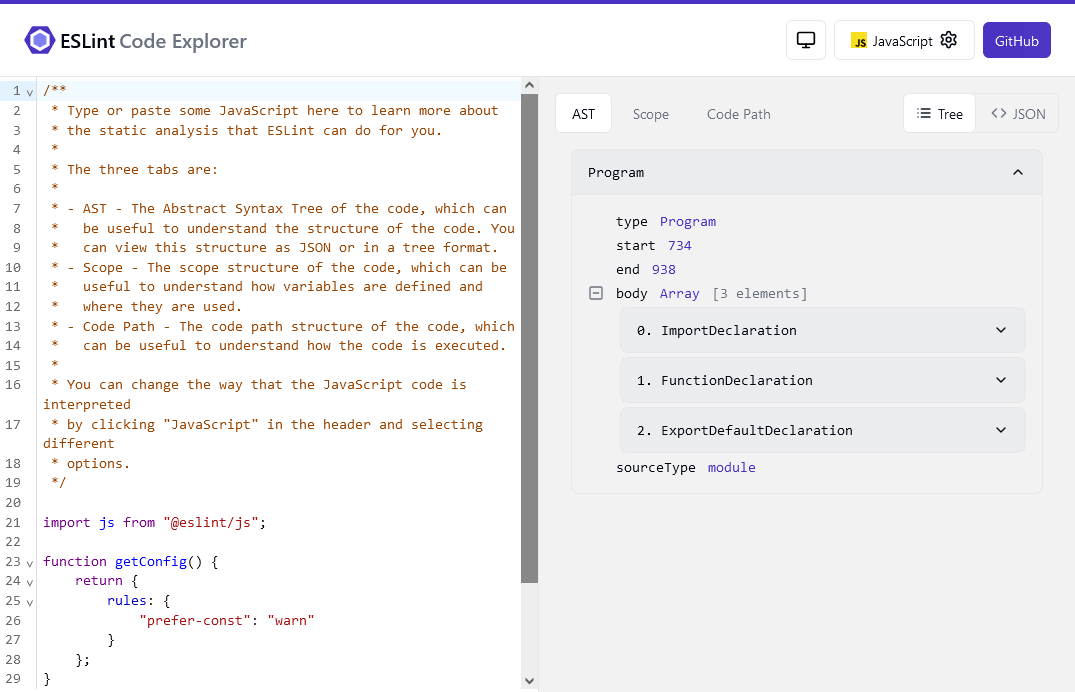
代码资源管理器允许你查看和探索不同语言的抽象语法树(AST),以帮助创建自定义规则。对于 JSON 和 Markdown,你将获得一个可展开的 AST 视图,而 JavaScript 不仅允许你查看 AST,还可以查看 ESLint 在解析代码时生成的作用域和代码路径信息。今后,我们将继续更新代码资源管理器,增加新的语言和功能,以帮助你创建自定义规则。
🌐 Code Explorer allows you to view and explore the AST of different languages to help in creating custom rules. For JSON and Markdown, you’ll get an expandable view of the AST, while JavaScript allows you to see not just the AST but also the scope and code path information that ESLint generates as it parses your code. Going forward, we’ll continue to update Code Explorer with new languages and capabilities designed to help you create custom rules.
最棒的部分?代码浏览器是开源的,所以你可以帮助我们让它变得更好。
🌐 And the best part? Code Explorer is open source, so you can help us make it even better.
🌐 Write your own language plugin
ESLint 语言的设计方式使它们可以通过新的 languages 键包含在任何插件中。@eslint/json 和 @eslint/markdown 插件不仅旨在分别提供 JSON 和 Markdown 的 lint 功能,同时也作为如何创建自己语言的示例。你可以查看 languages 文档 以了解如何创建你自己的语言的概述。
🌐 ESLint languages are designed in such a way that they can be included in any plugin using a new languages key. The @eslint/json and @eslint/markdown plugins are intended not only to provide JSON and Markdown linting, respectively, but also as examples of how to create your own languages. You can check out the languages documentation for an overview of how you can create your own language.
🌐 Conclusion
对 JavaScript 以外的语言进行 lint 已经在 ESLint 的路线图上存在一段时间了,因此达到这一里程碑令人兴奋。我们的长期目标是确保 ESLint 可以对你在 web 项目中可能使用的任何类型的文件进行 lint,无论是通过官方支持的语言插件还是社区编写的插件。对于 JavaScript、JSON 和 Markdown,我们已经在朝着实现这一目标的道路上走得很顺利。
🌐 Linting languages other than JavaScript has been on the ESLint roadmap for a while, so it’s exciting to reach this milestone. Our long-term goal is to ensure that ESLint can lint any kind of file you might use in a web project, whether that be with officially supported language plugins or with community-written plugins. With JavaScript, JSON, and Markdown, we’re already well on our way towards achieving that goal.
提醒一下,ESLint 是一个独立的开源项目,由一群志愿者在业余时间维护。如果你喜欢使用 ESLint,请与你的公司讨论赞助该项目的事宜。
🌐 As a reminder, ESLint is an independent open source project maintained by a group of volunteers in their spare time. If you enjoy using ESLint, please talk to your company about sponsoring the project.
最新的 ESLint 新闻、案例研究、教程和资源。